
Don’t Get Hooked: How to Spot Phishing and Spoofed Server Alerts
Don’t Get Hooked: How to Spot Phishing and Spoofed Server Alerts
In the digital world, your email inbox is a gateway—but not every visitor is friendly. Recently, many of our clients have reported receiving emails that look like official server notifications, storage alerts, or security warnings.
These “spoofed” emails are designed to trick you into giving away passwords or clicking malicious links. Here is how you can stay one step ahead of the scammers.
1. Check the “Friendly Name” vs. the Actual Email Address
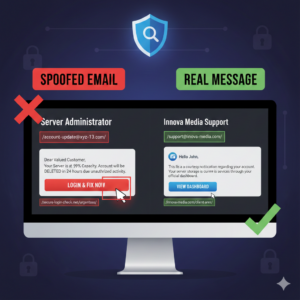
Scammers often set the sender’s name to something official like “Server Administrator” or “Innova Media Support.”
- The Trick: On a phone or desktop, you might only see the name.
- The Fix: Click or hover over the sender’s name to reveal the actual email address behind it. If the name says “Innova Media” but the email address is `account-update@xyz-123.com`, it’s a fake.
2. Look for “Urgency” as a Red Flag
Phishing relies on panic. If an email claims your account will be **deleted in 24 hours** or your “server is at 99% capacity,” take a deep breath.
*Pro Tip: Genuine service providers usually give ample warning and won’t use aggressive, threatening language to get you to log in.
3. Inspect the Links (Without Clicking!)
Before you click a “Login” or “Verify Account” button, check where it’s actually sending you.
- On Desktop: Hover your mouse over the link. The destination URL will appear in the bottom corner of your browser.
- On Mobile: Long-press the link to see the URL preview.
- What to look for: If the link is a jumble of random letters or doesn’t include the official company domain (e.g., it goes to `secure-login-check.net` instead of `innova-media.com`), stay away.
4. Watch for Generic Greetings & Typos
While scammers are getting better, many phishing attempts still feel “off.”
- Generic Greetings: Phrases like “Dear Valued Customer” instead of your name are common in bulk phishing.
- Bad Grammar: Professional server messages are rarely riddled with spelling errors or awkward phrasing.
5. The “Double-Check” Rule
If you receive a suspicious alert about your hosting or server:
- Do not click the links in the email.
- Do open a new browser tab and log in to your account through the official website you always use.
- Check your dashboard: If there is a real issue, you will see the notification there.
Stay Safe
Cybersecurity is about staying vigilant. If you ever receive an email that seems to be from us and you aren’t sure if it’s legitimate, please reach out directly through our official contact channels. We would much rather confirm a real message for you than help you recover a compromised account.